# Can not run an emulator
**URL:** https://forum.webostv.developer.lge.com/t/can-not-run-an-emulator/1076
**Category:** SDK
**Created:** [November 18, 2022, 2:34am UTC](https://forum.webostv.developer.lge.com/t/can-not-run-an-emulator/1076 "2022-11-18T02:34:32Z")
**Posts on this page:** 20
**Page:** 1
### Author:  [@asumranphan](https://forum.webostv.developer.lge.com/u/asumranphan)
#### Post date: [November 18, 2022, 2:34am UTC](https://forum.webostv.developer.lge.com/t/can-not-run-an-emulator/1076/1 "2022-11-18T02:34:32Z")
Once I execute the `./run_webos_emulator.sh` script. It doesn’t seem to work properly and shows an error popup.

macOS Catalina 10.15.7
Virtualbox 6.1.40 r154048 (Qt5.6.3)
---
### Author:  [@narae0.kim](https://forum.webostv.developer.lge.com/u/narae0.kim)
#### Post date: [November 28, 2022, 7:41am UTC](https://forum.webostv.developer.lge.com/t/can-not-run-an-emulator/1076/2 "2022-11-28T07:41:02Z")
Sorry for the late reply. We checked it with several PCs, but the issue was not reproduced. Please reinstall the emulator. If the problem persists, please share your screenshot from the step 1 to 2 [here](https://webostv.developer.lge.com/develop/tools/emulator-installation#install-macos). Thank you.
---
### Author:  [@brunobispo](https://forum.webostv.developer.lge.com/u/brunobispo)
#### Post date: [December 19, 2022, 2:05pm UTC](https://forum.webostv.developer.lge.com/t/can-not-run-an-emulator/1076/3 "2022-12-19T14:05:09Z")
I’m having the exact same problem.
macOS Catalina 11.7 (20G817)
VirtualBox 6.1.40 r154048 (Qt5.6.3)
Have you figured out how to get around this?
---
### Author:  [@narae0.kim](https://forum.webostv.developer.lge.com/u/narae0.kim)
#### Post date: [December 20, 2022, 3:03am UTC](https://forum.webostv.developer.lge.com/t/can-not-run-an-emulator/1076/4 "2022-12-20T03:03:58Z")
Please check our reply above and share a screenshot if the problem persists. Thank you.
---
### Author:  [@brunobispo](https://forum.webostv.developer.lge.com/u/brunobispo)
#### Post date: [December 20, 2022, 12:15pm UTC](https://forum.webostv.developer.lge.com/t/can-not-run-an-emulator/1076/5 "2022-12-20T12:15:32Z")
Running `./vm_register.command` seems to work correctly, as it returns nothing. But `./run_webos_emulator.sh` shows the exact same message OP posted.
Although I can launch the created image by double clicking the VM’s name on VirtualBox, I have no remote control.
---
### Author:  [@narae0.kim](https://forum.webostv.developer.lge.com/u/narae0.kim)
#### Post date: [December 21, 2022, 12:04am UTC](https://forum.webostv.developer.lge.com/t/can-not-run-an-emulator/1076/6 "2022-12-21T00:04:41Z")
Can we get a screenshot of the terminal? You can email us at [developer@lge.com](mailto:developer@lge.com).
---
### Author:  [@narae0.kim](https://forum.webostv.developer.lge.com/u/narae0.kim)
#### Post date: [January 4, 2023, 4:09am UTC](https://forum.webostv.developer.lge.com/t/can-not-run-an-emulator/1076/7 "2023-01-04T04:09:32Z")
To run the remote control unit emulator, ./run\_webos\_emulator.sh must be completed. Please check the following.
- Check if your Mac uses Apple Silicon. Currently, Intel chips are only supported.
- Make sure vboxmanage is running. (You can check this using vboxmanage -v command.)
- Try another version of VirtualBox. You can download the v6.1.30 at [https://www.virtualbox.org/wiki/Download\_Old\_Builds\_6\_1](https://www.virtualbox.org/wiki/Download_Old_Builds_6_1).
---
### Author:  [@dalarcon](https://forum.webostv.developer.lge.com/u/dalarcon)
#### Post date: [June 28, 2023, 10:09am UTC](https://forum.webostv.developer.lge.com/t/can-not-run-an-emulator/1076/8 "2023-06-28T10:09:05Z")
I am having the exact same error, my specs:
- MacOS Monterey 12.6.3
- VirtualBox 6.1.30r148432
- Processor 2,6 GHz 6-Core Intel Core i7
Did anyone find any solution?

---
### Author:  [@narae0.kim](https://forum.webostv.developer.lge.com/u/narae0.kim)
#### Post date: [June 29, 2023, 7:56am UTC](https://forum.webostv.developer.lge.com/t/can-not-run-an-emulator/1076/9 "2023-06-29T07:56:41Z")
Have you checked the `which vboxmanage` command?
---
### Author:  [@Deelio37](https://forum.webostv.developer.lge.com/u/Deelio37)
#### Post date: [October 3, 2023, 3:53pm UTC](https://forum.webostv.developer.lge.com/t/can-not-run-an-emulator/1076/10 "2023-10-03T15:53:36Z")
Same exact issue here.
VirtualBox version 6.1.46 r158378 (Qt5.6.3)
MacBook Pro 2019
2.6 GHz 6-Core Intel Core i7
Radeon Pro 555X 4 GB
Intel UHD Graphics 630 1536 MB
```auto
$ which vboxmanage
/usr/local/bin/vboxmanage
$ vboxmanage -v
6.1.46r158378
```
---
### Author:  [@narae0.kim](https://forum.webostv.developer.lge.com/u/narae0.kim)
#### Post date: [October 6, 2023, 12:06am UTC](https://forum.webostv.developer.lge.com/t/can-not-run-an-emulator/1076/11 "2023-10-06T00:06:00Z")
Please try a different version of VirtualBox. You can download the v6.1.30 at [https://www.virtualbox.org/wiki/Download\_Old\_Builds\_6\_1](https://www.virtualbox.org/wiki/Download_Old_Builds_6_1).
---
### Author:  [@watislaf](https://forum.webostv.developer.lge.com/u/watislaf)
#### Post date: [October 21, 2023, 7:34pm UTC](https://forum.webostv.developer.lge.com/t/can-not-run-an-emulator/1076/12 "2023-10-21T19:34:31Z")
hi. I have the exact same issue.
$ which vboxmanage
/usr/local/bin/vboxmanage
$ vboxmanage -v
vboxmanage -v 6.1.30r148432
---
### Author:  [@narae0.kim](https://forum.webostv.developer.lge.com/u/narae0.kim)
#### Post date: [October 23, 2023, 6:10am UTC](https://forum.webostv.developer.lge.com/t/can-not-run-an-emulator/1076/13 "2023-10-23T06:10:26Z")
Please make sure your PC meets the [system requirements](https://webostv.developer.lge.com/develop/tools/emulator-installation#system-requirements). Thank you.
---
### Author:  [@user1820](https://forum.webostv.developer.lge.com/u/user1820)
#### Post date: [July 23, 2025, 12:18am UTC](https://forum.webostv.developer.lge.com/t/can-not-run-an-emulator/1076/14 "2025-07-23T00:18:50Z")
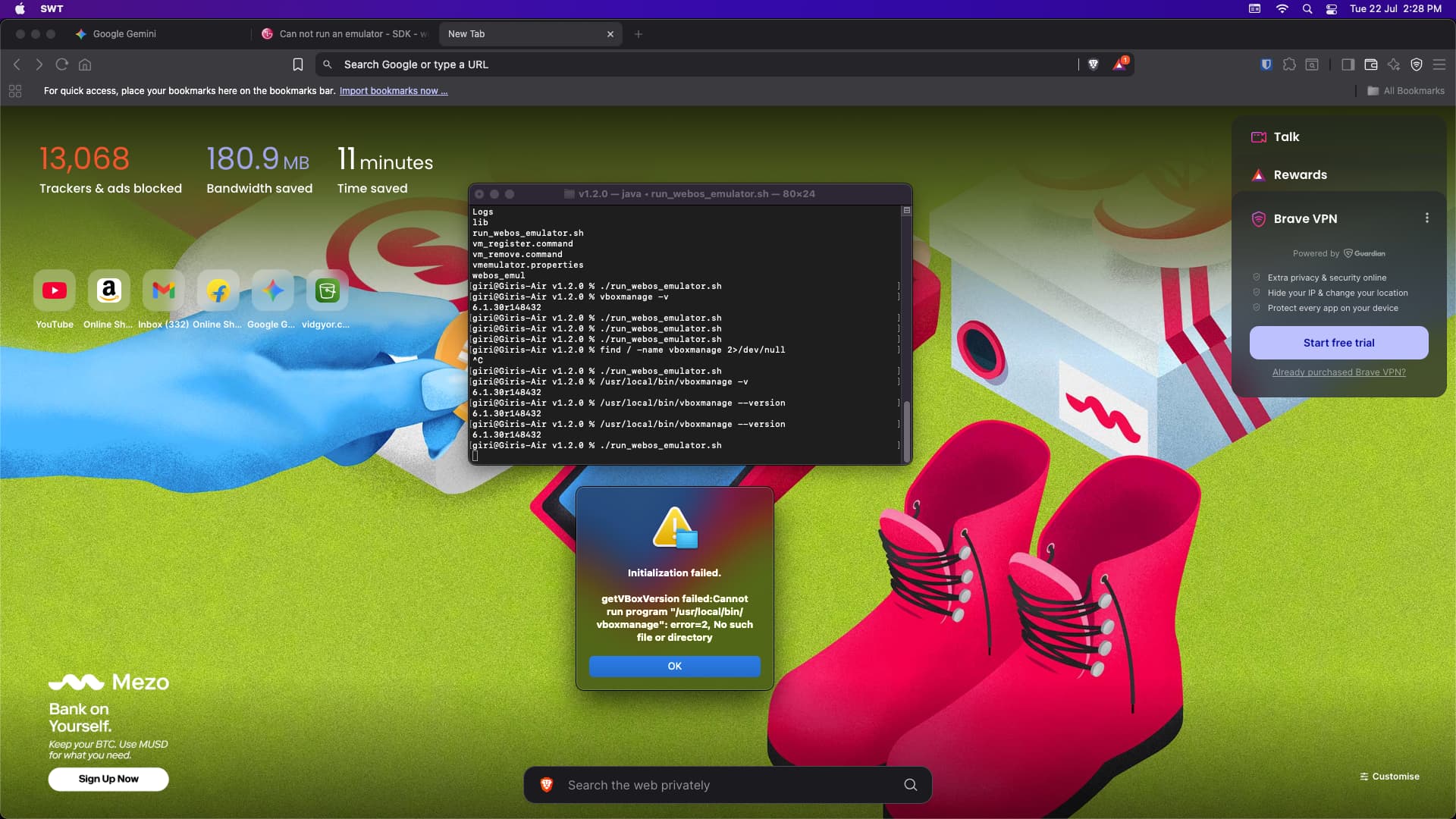
I am also facing the same issue. How to fix this? Please help.
---
### Author:  [@narae0.kim](https://forum.webostv.developer.lge.com/u/narae0.kim)
#### Post date: [July 23, 2025, 12:21am UTC](https://forum.webostv.developer.lge.com/t/can-not-run-an-emulator/1076/15 "2025-07-23T00:21:06Z")
Please make sure your PC meets the [system requirements](https://webostv.developer.lge.com/develop/tools/emulator-installation#system-requirements). Thank you.
---
### Author:  [@user1820](https://forum.webostv.developer.lge.com/u/user1820)
#### Post date: [July 27, 2025, 11:20pm UTC](https://forum.webostv.developer.lge.com/t/can-not-run-an-emulator/1076/16 "2025-07-27T23:20:57Z")
I am using MacBook Air (13-inch, 2017) with 1.8 GHz Dual-Core Intel Core i5 processor with MacOs version 12.7.6
But in the system requirements it is mentioned
- macOS 10.12 Sierra (supported but not fully tested)
- macOS 10.13 High Sierra - 11 Big Sur
- Intel chip (Apple silicon is not supported)
I am assuming that the emulator will work on macOS 10.13 and higher. Is my assumption correct or it will only work on the above mentioned particular OS versions.
---
### Author:  [@narae0.kim](https://forum.webostv.developer.lge.com/u/narae0.kim)
#### Post date: [July 28, 2025, 7:53am UTC](https://forum.webostv.developer.lge.com/t/can-not-run-an-emulator/1076/17 "2025-07-28T07:53:19Z")
webOS TV Emulator is deprecated, so later OS’s are not tested. Did you execute the chmod 777 command in the webOS TV Emulator directory as described [here](https://webostv.developer.lge.com/develop/tools/emulator-installation#install-macos)?
---
### Author:  [@user1820](https://forum.webostv.developer.lge.com/u/user1820)
#### Post date: [July 28, 2025, 9:51pm UTC](https://forum.webostv.developer.lge.com/t/can-not-run-an-emulator/1076/18 "2025-07-28T21:51:31Z")
Yes, I did. But it is not working.
---
### Author:  [@narae0.kim](https://forum.webostv.developer.lge.com/u/narae0.kim)
#### Post date: [July 29, 2025, 5:54am UTC](https://forum.webostv.developer.lge.com/t/can-not-run-an-emulator/1076/19 "2025-07-29T05:54:39Z")
Please make sure you have installed the emulator in VirtualBox and try running it directly from VirtualBox. Thank you.
---
### Author:  [@user1820](https://forum.webostv.developer.lge.com/u/user1820)
#### Post date: [July 31, 2025, 7:27am UTC](https://forum.webostv.developer.lge.com/t/can-not-run-an-emulator/1076/20 "2025-07-31T07:27:06Z")
I have done as you suggested, now the app is running virtual box, but the remote control application is not working. Please find the recording of the same. I tried changing the file permissions, but that didn’t help.
Please find the video recording of the same
> **[Screen Recording 2025-07-31 at 10.54.25 AM.mov](https://drive.google.com/file/d/1GB6dEQscpbYuhxpvpnRXr7nJe9oataN9/view?usp=sharing)**
>
> Google Drive file.
[Next page](https://forum.webostv.developer.lge.com/t/can-not-run-an-emulator/1076.md?page=2)